Login
English

Select your language

English
Français
Deutsch
Platform
SOLUTIONS
Experimentation
Feature Management
add-ons & KEY Features
Mobile App Testing
Recommendations & Search
Personalization
Single Page Applications
integrate to your stack
Specialities
for all teams
Marketing
Product
Engineering
For INDUSTRIES
Healthcare
Financial Services
E-commerce
Automotive
Travel & Tourism
Media & Entertainment
B2B

Optimize digital experiences by chatting with AI and win up to $100,000

join the contest
PlansCustomersResources
Book a demo
Book a demo

Quick links

Book a demo
Book a demo
All resources
The 12 Kameleoon days of Christmas: part 8


The 12 Kameleoon days of Christmas: part 8

Fred De Todaro
Published on
December 9, 2020
Product Updates

Article

Understanding your data is key to taking the right decisions on your experimentation and personalization results. However, given the range and number of KPIs and goals that can be set and monitored, ensuring that you are able to easily see and analyze your results can be difficult.

To help users better see the wood for the trees when it comes to data, today’s Kameleoon technical tip explains how you can customize how your results are displayed, at the click of a mouse.

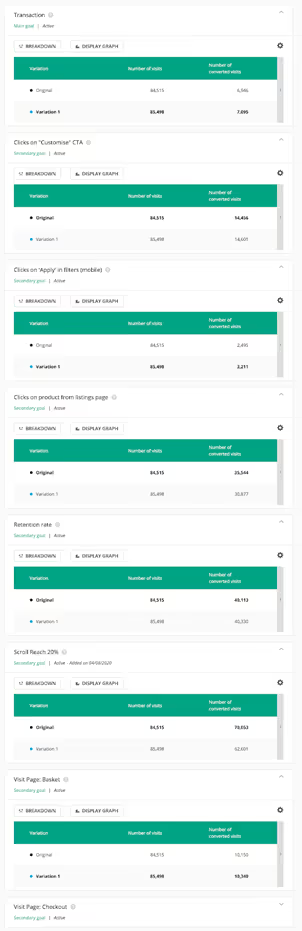
1 Switching to view by variant

Traditionally your results dashboard displays one box for each KPI that you are measuring in your experiment. That means that if the experiment has a lot of KPIs or goals it has a lot of boxes, making it difficult to read and understand the results.
Switching to view by variant

​

With Kameleoon you can completely change and customize your view. Instead of a separate box for every KPI you can switch to viewing by variant, modifying how all results are presented in graphs and tables.
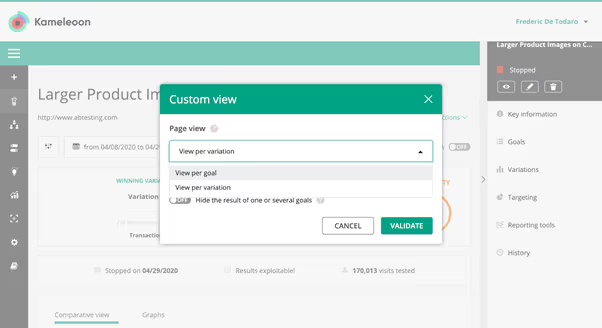
Switching to view by variant

​

This makes it much simpler to visualize your results and understand the impact of each variant in the experiment. You can then set this as your default view so that you always see results in the way that best meets your needs.
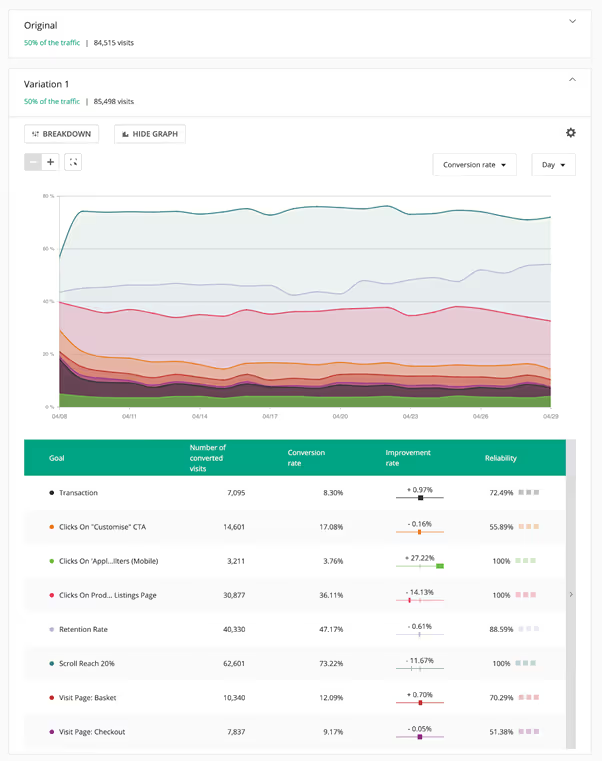
Switching to view by variant

​

If you like this view, you can even save it as a template and make it the default view for all your experiments, again..with a click of the mouse!
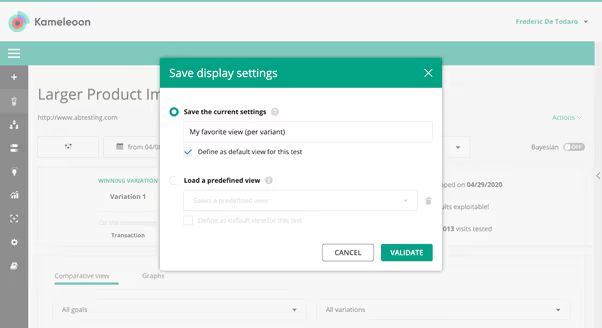
Switching to view by variant

​

Learn more about how to create a custom view here - and come back tomorrow to find out how Kameleoon delivers omnichannel cross-device reconciliation for your experiments and personalizations.
ebook-12-features-kameleoon

,

Read more in the series here:

  • Day 1: Visualization of modified/tracked elements on a page
  • Day 2: Reallocating traffic in case of issues
  • Day 3: Simulation mode: visit and visitor generator
  • Day 4: Click tracking: automatically send events to analytics tools such as Google Analytics
  • Day 5: Adding a global code to an experiment
  • Day 6: Excluding time periods from results
  • Day 7: Measuring confidence stability
  • Day 8: Switching to custom views
  • Day 9: Using custom data for cross-device reconciliation
  • Day 10: Personalization campaign management
  • Day 11: Adding CSS selectors
  • Day 12: Changing hover mode

Explore our resources

Kameleoon’s improved Widget Studio for no-code building

Product Updates

Article

Test, learn, and engage: announcing the Kameleoon + Braze integration

Product Updates

Article

Why product teams need experimentation powered by AI prompting

AI

Article

Experiment your way

Get the key to staying ahead in the world of experimentation.

[Placeholder text - Hubspot will create the error message]
Thanks for submitting the form.

Newsletter

Platform
ExperimentationFeature ManagementPBX Free-TrialMobile App TestingProduct Reco & MerchData AccuracyData Privacy & SecuritySingle Page ApplicationAI PersonalizationIntegrations
guides
A/B testingVibe ExperimentationFeature FlaggingPersonalizationFeature ExperimentationAI for A/B testingClient-Side vs Server-Side
plans
PricingMTU vs MAU
Industries
HealthcareFinancial ServicesE-commerceAutomotiveTravel & TourismMedia & EntertainmentB2B & SaaS
TEAMS
MarketingProductDevelopers
Resources
Customers StoriesAcademyDev DocsUser ManualProduct RoadmapCalculatorWho’s Who
compare us
OptimizelyVWOAB Tasty
partners
Integrations DirectoryPartners Directory
company
About UsCareersContact UsSupport
legal
Terms of use and ServicePrivacy PolicyLegal Notice & CSUPCI DSS
© Kameleoon — 2025 All rights Reserved
Legal Notice & CSUPrivacy policyPCI DSSPlatform Status