Login
English

Select your language

English
Français
Deutsch
Platform

PROMPT-BASED EXPERIMENTATION

Optimize any website by chatting with PBX, Kameleoon’s AI. Learn more

SOLUTIONS
Experimentation
Feature Management
KEY Features & add-ons
Mobile App Testing
Recommendations & Search
Personalization
specialities
AI in Experimentation
Single Page Application
Data Security & Privacy
Data Accuracy
Integrations & APIPartners ProgramSupportProduct Roadmap
Solutions
for all teams
Marketing
Product
Engineering
Data Scientists
For INDUSTRIES
Healthcare
Travel & Tourism
Financial Services
Media & Entertainment
E-commerce
B2B
Automotive

Samsung gains autonomy and speed in its most advanced tests with PBX

read the success story
PlansCustomersResources
Book a demo
Book a demo

Quick links

Heading 2
Book a demo
Book a demo

All resources
The 12 Kameleoon days of Christmas: part 12

The 12 Kameleoon days of Christmas: part 12

Fred De Todaro
Published on
December 15, 2020
Product Updates

Article

We’ve now reached the last blog of our 12 days of Christmas series, highlighting key, added-value features of the Kameleoon platform. We hope you’ve found it useful and that it demonstrates how the platform can help you do your job more efficiently - read on to learn about our 12th tip and to find out how you can download the full set to study at your leisure.

Today we look at how you can modify what appears when a visitor’s mouse hovers over a specific element, adding depth to your experiments and personalizations.

1 Changing the appearance in hover mode

Hover mode enables visitors to receive additional information when mousing over an element, such as a menu, image or graphical block. Changing this information, either to personalize it to the visitor’s specific needs or to test alternative approaches adds depth to your optimization efforts.
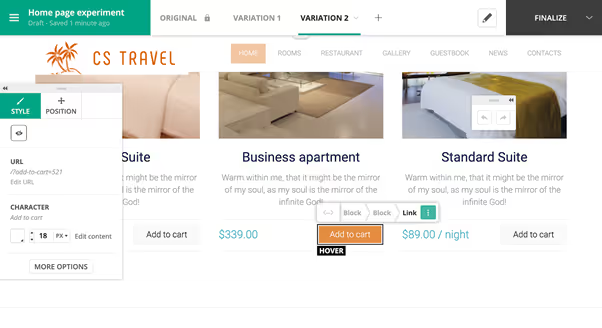
Kameleoon: Hover mode

​

With Kameleoon we want anyone to be able to make even the most complex changes without having to write a single line of code. So it is straightforward to modify what appears in hover mode, both at the high level (such as a top menu) and by drilling down to lower levels (such as sub-menu). Watch our video to learn more, and of course read a full explanation in our developer documentation.

Want to catch up on all of our 12 days of Christmas technical blogs? Either click on the links below to read each post or download our complete holiday eguide to access the entire set.

 

ebook-12-features-kameleoon

,

Read more in the series here:

  • Day 1: Visualization of modified/tracked elements on a page
  • Day 2: Reallocating traffic in case of issues
  • Day 3: Simulation mode: visit and visitor generator
  • Day 4: Click tracking: automatically send events to analytics tools such as Google Analytics
  • Day 5: Adding a global code to an experiment
  • Day 6: Excluding time periods from results
  • Day 7: Measuring confidence stability
  • Day 8: Switching to custom views
  • Day 9: Using custom data for cross-device reconciliation
  • Day 10: Personalization campaign management
  • Day 11: Adding CSS selectors
  • Day 12: Changing hover mode

Explore our resources

That’s a wrap on the world’s first Promptathon!

AI

Article

How to avoid common data accuracy pitfalls in A/B testing

Web Experimentation

Article

A/A Tests: How to use A/A testing in your experimentation program

Web Experimentation

Article

“We needed a way to assess visitor interest more accurately. With manual scoring, lead quality was too low. We chose Kameleoon for its AI, which precisely targets visitors based on their interest in our cars.”

Caroline Josse
Head of Marketing Digital & Acquisition at Toyota

“This campaign shows the multiple benefits of artificial intelligence for personalization. Toyota’s teams have been completely convinced by the performance of Kameleoon’s AI personalization solution and are expanding this approach across the customer journey.”

Caroline Josse
Head of Marketing Digital & Acquisition at Toyota
before ai
Book a demo
Book a demo
Book a demo
Book a demo
Experiment your way

Get the key to staying ahead in the world of experimentation.

[Placeholder text - Hubspot will create the error message]
Thanks for submitting the form.

Newsletter

Platform
ExperimentationFeature ManagementPBX Free-TrialMobile App TestingProduct Reco & MerchData AccuracyData Privacy & SecuritySingle Page ApplicationAI PersonalizationIntegrations
guides
A/B testingVibe ExperimentationFeature FlaggingPersonalizationFeature ExperimentationAI for A/B testingClient-Side vs Server-Side
plans
PricingMTU vs MAU
Industries
HealthcareFinancial ServicesE-commerceAutomotiveTravel & TourismMedia & EntertainmentB2B & SaaS
TEAMS
MarketingProductDevelopers
Resources
Customers StoriesAcademyDev DocsUser ManualProduct RoadmapCalculatorWho’s Who
compare us
OptimizelyVWOAB Tasty
partners
Our Partner EcosystemBecome a PartnerIntegrations DirectoryPartners Directory
company
About UsCareersContact UsSupport
legal
Terms of use and ServicePrivacy PolicyLegal Notice & CSUPCI DSS
© Kameleoon — 2025 All rights Reserved
Legal Notice & CSUPrivacy policyPCI DSSPlatform Status