What are the different types of internet cookies?


One of the first things you're likely to see when you visit a website is their web cookie policy.
Some sites use language like:
“We use cookies to make your experience on our site better. By using this site, you agree…”
In other jurisdictions, just continuing to use the website is not the same as consent and ask you to specificlly opt in.
The website’s internet cookie policy tells you that the site is using cookies to improve your experience on that site.
But the truth is that until you dig further into the site’s policy, you may not know exactly the types of web cookies the site is collecting and if these cookies pose any security risks to you.
In this guide, we will break down everything you need to know about web cookies.
What are web cookies?
Web cookies are small text files that contain bits of data. They're stored by the browser on your device.

When you visit a website, the site’s server creates bits of data about you which are stored on your browser. This data may contain account information, your shopping cart contents, pages you visited, or even items you viewed on an e-commerce site.
The next time you visit that website, your browser sends information about your last visit to the server. This helps the website remember details about your last visit and provide a better experience for the present one. For example, you add some items to your cart and close the webpage. If you visit that site again the next day, your items are still in your cart.
Different types of internet cookies
Not all web cookies serve the same functions. Depending on the type of cookie, it could persist on your browser as long as your session lasts, or for many months.
There are the four main types of internet cookies:
Session cookies
These are temporary web cookies that are only present as long as your web browser stays open or your session is active. Once you close your browser, these cookies are removed from your device.
Session cookies can have various uses. For example, e-commerce websites use session cookies to keep your cart items available while you peruse other product pages in search of new items you want to buy.
Persistent cookies
Persistent, or permanent web cookies last longer than session cookies. The website you visit creates this cookie and attaches an expiration date to it. Persistent cookies have limits in how long that expiration date can be, but this will vary by jurisdiction and geolocation.
Websites use these internet cookies to remember information about you and provide better experiences. For example, a website can use permanent cookies to remember your login information so you don’t have to re-enter your username and password every time you visit the site.
Third-party cookies
These web cookies are created by a website you’re not visiting. They are usually created by advertisers to associate you with a website where you clicked on an ad.
These cookies gather data about your browsing habits and allow websites and advertisers to track you across multiple websites and serve ads to you wherever you go across the internet.
First-party cookies
First-party cookies are the web cookies created by the website you’re visiting. They are generally used to improve your experience on the site.
For example, when you first visit a website and change the language from English to French, the site creates a cookie to help it remember your choice. On your next visit, you see the website in the language you selected last time.
First-party internet cookies also perform functions like letting you add multiple items to your cart and even remember your login information.
Uses of internet Cookies

There are different ways that a website can use web cookies. They typically fall into:
User experience
Websites you visit use first-party web cookies to enhance your experience and that of every visitor to their site.
When you visit a website with multiple languages, the site creates cookies used to remember your choice.
When you visit an e-commerce site, their internet cookies ensure that your experience adding items to your cart and checking out are easy. They're not the only way, but cookies are a popular way for e-commerce sites to support carts, sessions, and preferences.
Because a site may receive millions of visitors yearly, web cookies enable them to improve user experience for every visitor at scale.
Advertising and marketing
Third-party cookies play a huge role in online advertising and marketing.
Some advertisers use internet cookies that store information like age, gender and user behavior to serve visitors personalized ads. For example, advertisers don't want to display ads for retirement living to visitors they've identified as being ages 18-24.
Another use in online digital marketing is retargeting. In this practice, advertisers use third-party internet cookies to target you with ads for a product or service you saw earlier. For example, after you visit a university’s website and read about a postgraduate degree, you may begin seeing ads for the same degree on other websites.
Analytics and web optimization
Web cookies are important in web optimization and analytics measuring.
In A/B testing, your experimentation tool typically uses first-party web cookies to group your visitor into buckets for the different variations of your tests. This way it can ensure visitors who see your control will not see the new variation. This helps prevent contamination in your experiments.
These cookies typically last for 30 days, but this can vary widely; Kameleoon stores experiment allocation markers in Local Storage, with 30-day lifespan that renews on visit, but our first-party visitor identifier is stored for 365 days to empower long experiments when needed.
Another area of web optimization that uses internet cookies is personalization. When you are customizing experiences for different audience segments, cookies allow you to personalize at scale.
For example, cookies can store location labels based on IP lookups or browser geolocation APIs. Using this information, you can automatically change the language of your site to the one spoken most commonly where the visitor is accessing your site. Knowing that a visitor is accessing your site from Mexico, your site can automatically switch its language to Spanish.
Analytics tools use internet cookies to measure:
- How many people come to your website.
- How visitors interact with different pages on your site.
- How long web visitors spend on a page and more.
Benefits and drawbacks of web cookies
The main benefit to using web cookies is improving user experience.
Optimizing your website for better user experience increases your revenue, whether through quickly solving issues, improving checkout flows, or remembering preferences. Internet cookies enable all of these techniques and enable A/B testing to help fix the gaps in the strategy.
Like everything else, there are risks associated with web cookies. The main concern is usually invasion of privacy.
The ubiquity of third-party cookies from advertisers and the data they store make them a threat to your privacy.
Because of the insight cookies provide to the websites you visit, users need to be aware of the cookie policy of the websites they frequent. Some websites may have third-party cookies—which means someone other than the website you're visiting is storing cookies on your browser, and potentially collecting information you didn't explicitly sign off on. Some cookies can be persistent, which means a website or advertiser may continue to collect your browsing behavior long after you stopped visiting the original website. This, including some security reasons, are some of the considerations users have to make when reviewing the cookies they allow.
—Justin Irabor
Full Stack Web Developer, Tradecore
Many sites use Google products like Analytics, Maps and others. This gives Google the ability to gather sophisticated data about user behavior, depending on configuration and consent.
Other advertisers also use third-party web cookies to gather information about how you behave on websites, your age, location, gender and more. This data is then used to track and target you with ads across different sites.
Often, this information is gathered without your explicit permission, though this will vary by jurisdiction; in the EU and UK, for example, all non-essential cookies require opt-in consent.
There are real privacy concerns associated with persistent internet cookies, which is why it can be very beneficial to review the cookie policy on the sites you visit before consenting to them.
How to manage web cookies
The first step to managing cookies and protecting your privacy is knowing where the cookies are stored in your browser.
The next step is deleting unnecessary web cookies and those from sources you do not recognize.
Chrome
You can manage internet cookies in Chrome by blocking all cookies or taking a granular approach.

To block all cookies:
- Open your Chrome browser and click on the 3 vertical dots on the upper-right hand corner of your screen.
- Click on “Settings” in the drop-down menu.
- Then on “Privacy and Security” and finally on “Third-party cookies”.
- By default, Chrome allows all cookies. You can change this to “block all third-party cookies” to prevent ads from following you across the web.
- You can also set your browser to clear cookies and site data when you close all windows.
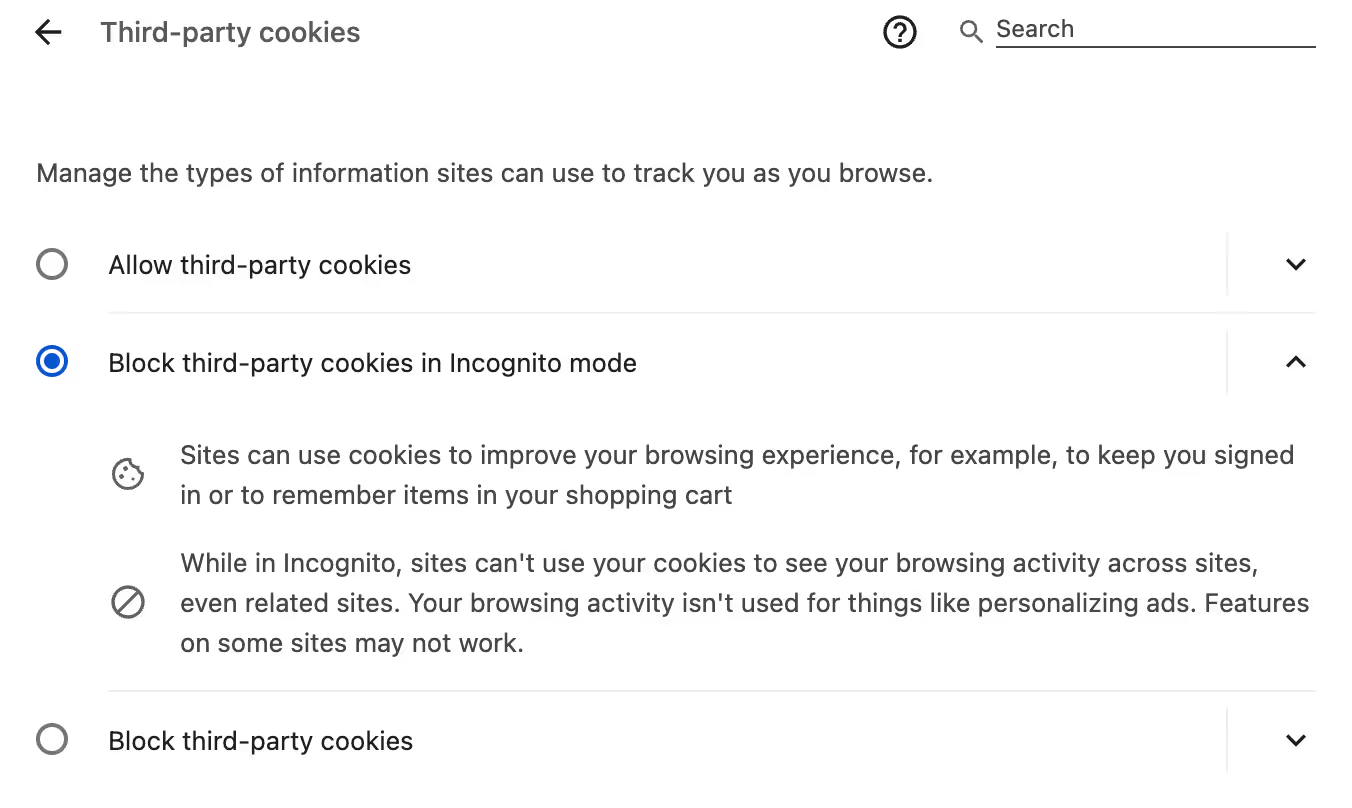
In the granular approach, you can manage and disable web cookies site by site.
- Follow steps 1-3 in the above. Then scroll down to the “See all site data and permission” option and click on it.
- This shows you which websites have cookies stored on your device and you can delete these cookies from there.
Firefox
In your Firefox browser, you can manage/disable cookies for a site or by blocking cookies for every site.
To clear cookies for all sites:
- Open your Firefox browser and click on the 3 horizontal bars on the upper-right hand corner of your screen.
- Click on “Settings” in the drop-down menu.
- Then on “Privacy and Security” and scroll down until you see “Cookies and Site Data”.
- Select “Clear Data” and a new pop-up will appear.
- Make sure “Cookies and Site Data” is checked.
- Click on “Clear” and this will remove all the site cookies and data.
- You can also set your Firefox browser to clear cookies and site data when you close all windows. Simply check the box beside “ Delete cookies and site data when Firefox is closed”.
To delete cookies by websites:
- Follow steps 1-3 in the above. Then click on “Manage Data”.
- You will see a new popup window with a search bar and a menu showing you all the sites that have cookies in your device.
- To remove all the cookies stored in Firefox, click on the “Remove All” and then “Save Changes”.
- To remove the cookies by websites, you can use the search bar to find a site or scroll until you find the site you want.
- Click on the website whose cookies you want to remove. Then click on “Remove Selected” and finally on “Save Changes”.
Safari
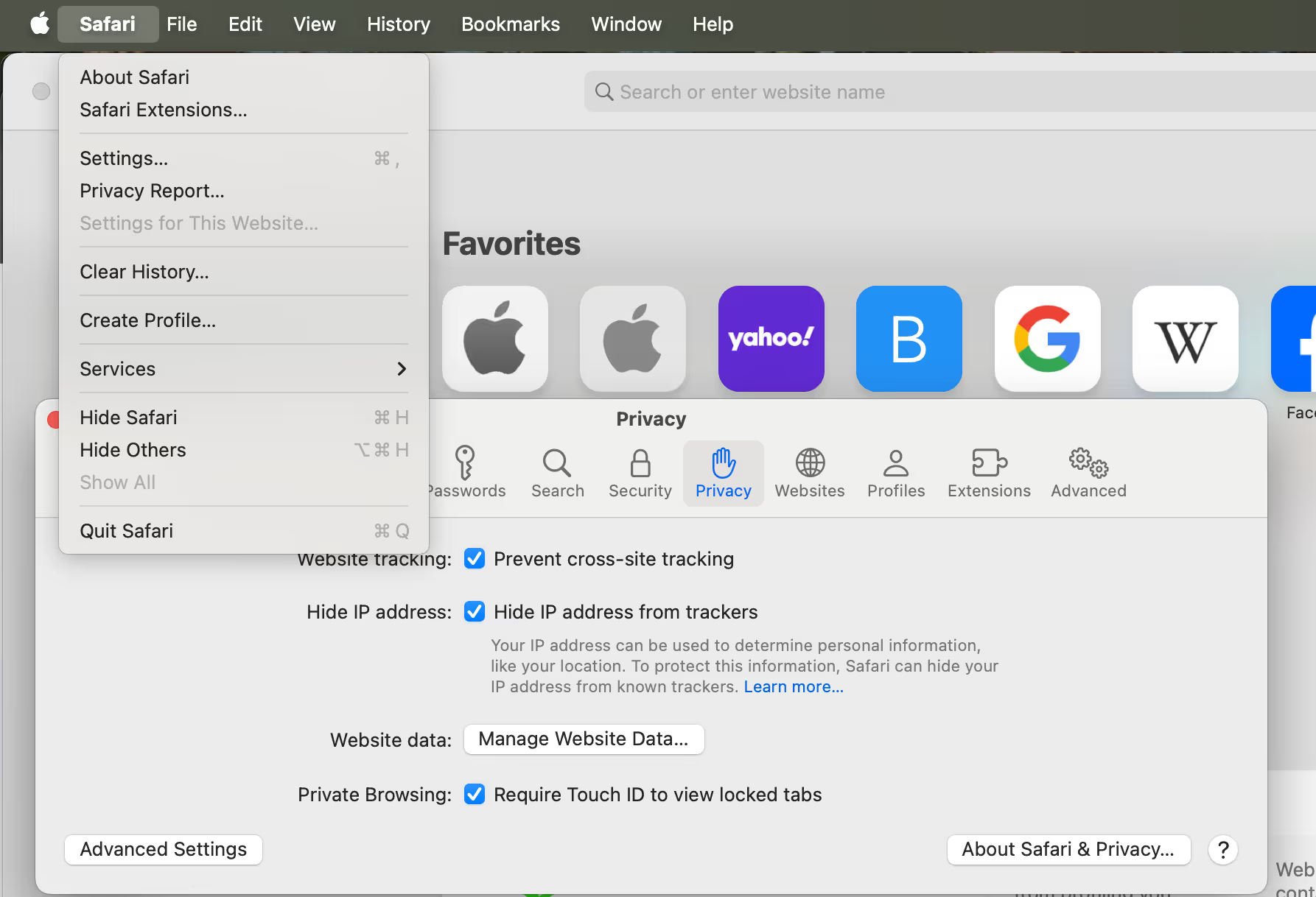
To block all cookies in your Safari browser:
- Go to “Settings” and then click on “Privacy”.
- Find the menu option “ Cookies and Website Data” and then check the box called “Block all cookies” to disable all cookies on your device.
To remove cookies from your device:
- Go to “Settings” and then click on “Privacy”.
- Find the menu option “ Cookies and Website Data” and then click on “Manage Website Data”.
- Select one, more or all sites and then click “remove” or “remove all” to delete some or all the cookies stored on your device.
What are JavaScript cookies?
In JavaScript, you can create, modify, read, and delete cookies using the document.cookie property.
Cookies in Javascript are not really different from web cookies as Javascript provides a framework for interacting with web cookies on the client side. Since your browser sends data to a web server, you can manage web cookies using Javascript on the browser side.
Because session cookies are deleted when you close your browser, you can prolong the life of the web cookie by adding an expiry date in UTC.
Common use cases for JavaScript cookies
Just like regular web cookies, you can use JavaScript cookies to:
- Save user preferences when they visit your website. For example, you can use JavaScript cookies to save a user’s preference for dark mode on your site. This way when they return to visit your site, you will show them a site in dark mode.
- Track how users behave on your site. This can be useful in your optimization efforts. For example, you can track where visitors are dropping off in their customer journey on your site. This provides an opportunity and avenue for optimizing their journey.
- Manage visitor’s sessions on your site. When a visitor arrives at your site/application, their browser cookies exchange information with your server. Because servers handle each request independently even if they’re coming from the same user, cookies are essential in letting the server know that all of these interactions are coming from one user.
- Personalize experiences for all users. Because of the information stored on cookies, you can personalize experiences for multiple users at once. For example, you can bucket users from Quebec into a cohort where your site appears to them exclusively in French.
The future of web cookies
Will you be able to use web cookies on your site in the future?
The answer isn’t a straightforward yes or no. It is more of an “it depends,” based on the reason you use cookies.
At one point, Google was considering phasing out third-party cookies, prompting many webmasters to search for alternatives. Though Google ultimately reversed course, the core concern with cookies remains: a lack of trust from your web visitors.
Juliana Jackson, Senior Data and Optimization Specialist at MediaMonks, agrees:
Customers want to feel safe online knowing that their personal data is secure and private, being confident that their data is not abused, and having the ability to control their data. Companies are used to collecting data about their users without having a clear purpose for what to do with that data. I hope that the increase in privacy regulations will also serve as an education piece for companies to focus more on behaviors, empathy, and building reliable and purposeful data collection mechanisms.The privacy regulations, browser changes, and the users' need for control don't only affect optimization; it affects how you run and maintain an online business. Optimization is just a part of a very big picture.
—Juliana Jackson
Senior Data and Optimization Specialist
That being said, here are some alternatives to web cookies you can use in your marketing, advertising, and A/B testing and optimization efforts:
- When it comes to optimizing and personalizing experiences for your visitors, moving your efforts server-side can reduce (or in some cases eliminate) the need for cookies, though you will still need a stable identifier (a login ID, for example) to ensure visitors are kept in the correct variation across visits. In Kameleoon, for example, you can effectively bucket your users for experiments by using a server-side snippet. This keeps your data accurate whilst respecting the privacy of your visitors.
- If you’re in advertising, contextual targeting is still available to you. Using this method, you show ads to visitors based on the content of a page they’re visiting. For example, if someone visited a page about museums in San Francisco on a travel site, you can show them ads about museum tours in the same location.
- Another alternative is cohort-based advertising. By grouping web visitors into cohorts based on interests, browsing habits, hobbies, and other characteristics, you create a group you can effectively serve ads to.
- Using a consent management platform (CMP), you can collect and manage personal information and consent from your site visitors to enhance user experience and other activities.

How will you use different types of internet cookies?
Web cookies are fundamental to the operation of modern websites and businesses. They make it easier for you to scale customer experience optimization for all visitors to your site.
Despite their immense benefits, cookies can be co-opted by bad actors and share information you do not consent to with third-parties. This makes it imperative for you to monitor, manage and remove cookies that come from websites you visit while you traverse the internet.
Web cookie management keeps your information private and prevents ads from stalking you while you browse the web.
If you’re on the hunt for an experimentation tool that helps reduce reliance on cookies and respects visitor privacy, check out our Data Accuracy page.

.jpg)