Login
English

Select your language

English
Français
Deutsch
Platform
SOLUTIONS
Experimentation
Feature Management
add-ons & KEY Features
Mobile App Testing
Recommendations & Search
Personalization
Single Page Applications
integrate to your stack
Specialities
for all teams
Marketing
Product
Engineering
For INDUSTRIES
Healthcare
Financial Services
E-commerce
Automotive
Travel & Tourism
Media & Entertainment
B2B

Optimize digital experiences by chatting with AI and win up to $100,000

join the contest
PlansCustomersResources
Book a demo
Book a demo

Quick links

Book a demo
Book a demo
All resources
Comment where the experiment lives: Comment Mode in the Graphic Editor


Comment where the experiment lives: Comment Mode in the Graphic Editor

Fred De Todaro
Published on
June 23, 2025
Product Updates

Article

There are a hundred places you can find feedback on your experiments today. Your Notion table? A screenshot in Slack? The fourth subtask in Asana? A dozen comments in Google Slides?

Centralizing your feedback is a crucial step towards improved communications, especially on experimentation that affects KPIs across multiple teams. 

That’s what the new Comment Mode in Kameleoon’s Graphic Editor solves. Comment Mode allows teams to share feedback directly in the experiment itself, where the changes actually happen.

The old way: chasing context

Reviewing a variation traditionally means toggling between tools. You might be familiar with the following Slack message, usually accompanied by a screenshot:

"Around 00:33 in the second variant, I noticed something we should follow up on.”

This kind of feedback is often vague and requires follow-up, which often leads to errors and missed revisions.

Comment Mode: feedback in the flow of work

Comment Mode allows your team to review, comment, and resolve directly in the Kameleoon Graphic Editor. 

1. Click the text bubble icon to open the comment sidebar. 
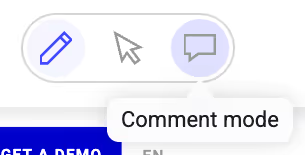
The Comment Mode button in the Kameleoon editor.

2. Choose the variation you want to comment on.

3. Add your comment. It will appear in the sidebar and is marked visually on the variant.
Comment notification in the Comment Mode Graphic Editor.

4. Tag teammates, reply in thread, and resolve once the comment is addressed. 

A resolved comment in the Graphic Editor.

Further features for fast-moving teams 
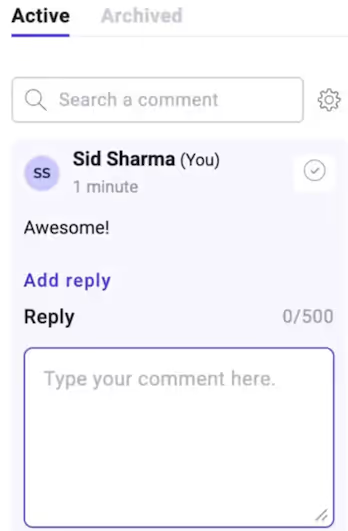
Reply to comments in Comment Mode.

Comment mode allows you to:

  • Add and edit comments on variations
  • Reply in threads to maintain important context
  • Track resolved comments in the Archived tab
  • Sort and filter comments by date, author, or mentions
  • Filter for comments you’re tagged in
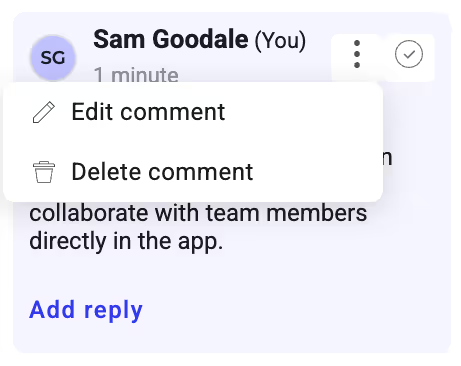
Edit or delete comments in Comment Mode.

Embrace fast feedback in Comment Mode

A fast feedback cycle is key to effective experimentation. Whether you’re designing a layout, reviewing copy, or combing for bugs, you work best when you can stay inside the platform you’re addressing.

No more switching tabs, chasing screenshots, or frantically trying to remember feedback. With Comment Mode, every conversation is tied to a specific element or variation. It works across roles and streamlines the review process. 

Start using Comment Mode today in the Graphic Editor and migrate your feedback into your experiments—where it belongs!
Explore our resources

Kameleoon’s improved Widget Studio for no-code building

Product Updates

Article

Test, learn, and engage: announcing the Kameleoon + Braze integration

Product Updates

Article

Why product teams need experimentation powered by AI prompting

AI

Article

Experiment your way

Get the key to staying ahead in the world of experimentation.

[Placeholder text - Hubspot will create the error message]
Thanks for submitting the form.

Newsletter

Platform
ExperimentationFeature ManagementPBX Free-TrialMobile App TestingProduct Reco & MerchData AccuracyData Privacy & SecuritySingle Page ApplicationAI PersonalizationIntegrations
guides
A/B testingVibe ExperimentationFeature FlaggingPersonalizationFeature ExperimentationAI for A/B testingClient-Side vs Server-Side
plans
PricingMTU vs MAU
Industries
HealthcareFinancial ServicesE-commerceAutomotiveTravel & TourismMedia & EntertainmentB2B & SaaS
TEAMS
MarketingProductDevelopers
Resources
Customers StoriesAcademyDev DocsUser ManualProduct RoadmapCalculatorWho’s Who
compare us
OptimizelyVWOAB Tasty
partners
Integrations DirectoryPartners Directory
company
About UsCareersContact UsSupport
legal
Terms of use and ServicePrivacy PolicyLegal Notice & CSUPCI DSS
© Kameleoon — 2025 All rights Reserved
Legal Notice & CSUPrivacy policyPCI DSSPlatform Status