.png)
PBX Build now uses full-site context to build stronger variations faster

PBX 2.0 covers every step of experimentation through five agents: Ideate, Build, Configure, Analyze, and Ship.
PBX Build is the coding agent, the one that writes code when you describe a variation in plain language.
The original Build could read the page in front of you; PBX 2.0 Build, available next month, will be able to read your entire website.
“I like how this works here; what if I bring it there?”
The most common request experimenters made of PBX 1.0 was the one thing it couldn’t do: take something from another page and use it on the page in front of it. “Build the homepage hero image on this PDP;” “add the copy from the checkout page to this cart page;” “build a carousel for this category page based on the one from the editorial section.”
PBX 2.0 Build can do this with a single prompt.
“I like how the homepage hero animates and how the checkout shows trust badges. Combine the two for the product detail page. Build it for me so I can test it.”
PBX will quickly pull the homepage hero, find the checkout trust badges, and assemble a new PDP variation that incorporates both. And because Build reads how those elements are used in context, the variation feels native.
PBX Build creates multiple variations and shows you mockups before it builds
Build now plans before it writes any code.
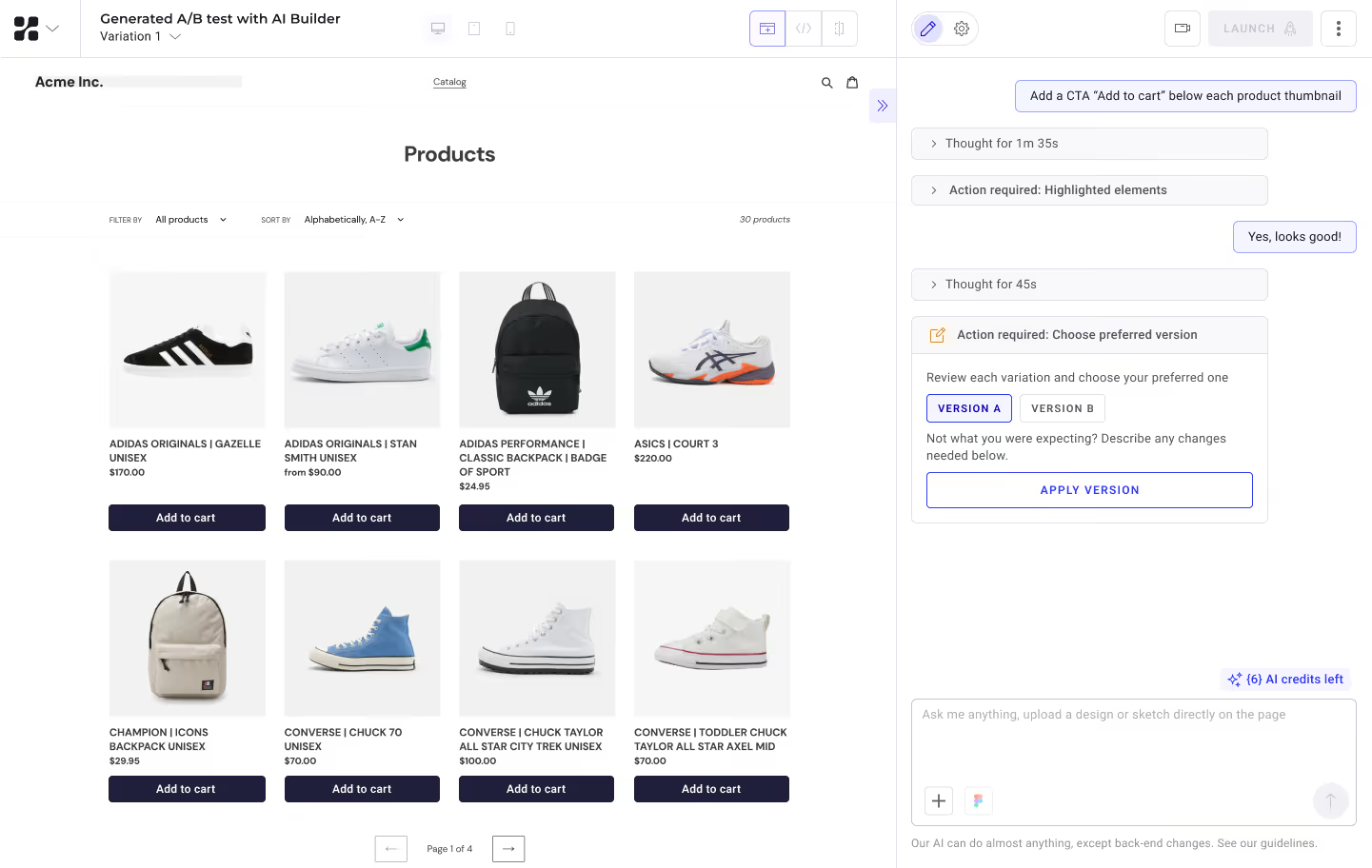
For example, if you tell it:
“Redesign the PDP hero with a candid photo of a customer using the product, a stronger headline, and a sticky add-to-cart that follows the user as the user scrolls.”
It will highlight placeholders directly on the page:
- A headline placeholder
- The sticky CTA anchored to the right of the price
If something still looks off, say so:
“Move the sticky CTA below the price. Make the headline shorter.”
Build will update the placeholders. Only once the plan is right will it write the code, generate the photo, and add the copy.
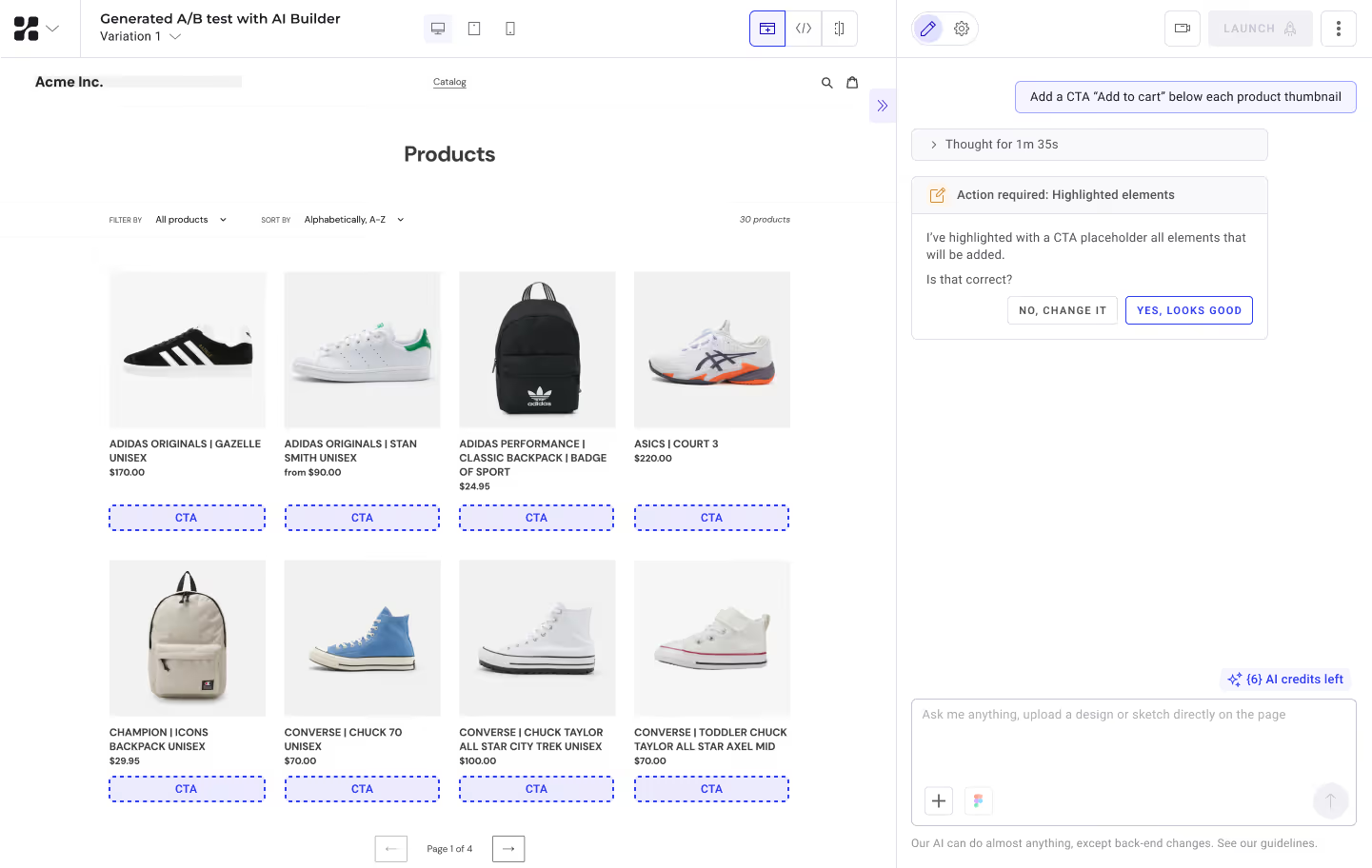
As all this happens, you can be working elsewhere; Build runs in the background. It shows estimated time remaining and pings you when your variation is ready. It can also produce a second version so you can compare options before launching.
Pull entire Figma flows into a test
We’ve also improved our Figma integration, allowing PBX to read the entire design file, pulling images, icons, vectors, and brand tokens straight from the file.
In addition, users are no longer limited to one Figma file per prompt or variant, meaning you can now ask PBX to build the variant from File A while taking into account the design system from File B.
Master Prompts keep the team pulling in the same direction
PBX Build now reads a Master Prompt set by project admins, which holds brand voice, technical constraints, accessibility rules, and code conventions. Every variation built inside that project follows it.
“Add a free shipping banner to the homepage. Match brand.”
With brand guidelines set in its Master Prompt, PBX Build understands what “match brand” means, keeping output consistent across the entire team.
When the variation is ready, hand it off to PBX Configure
Once your variation is ready, PBX Configure helps launch it. Set audience, goals, and traffic in the same interface you built the variation.
PBX 2.0 is an agentic AI system dedicated to the full experimentation cycle.
- Generate impactful test ideas with Ideate
- Create any web variation with Build
- Prep for launch with Configure
- Assess results with Analyze
- Push winning tests live with Ship
{{cta-block}}

Discover PBX 2.0 in action. PBX 2.0 covers every step of the experimentation cycle thanks to 5 AI agents: Ideate, Build, Configure, Analyze, and Ship.
Discover PBX 2.0 in action. PBX 2.0 covers every step of the experimentation cycle thanks to 5 AI agents: Ideate, Build, Configure, Analyze, and Ship.